
Why the Interface Wins: How Product Design Will Decide the Next Wave of AI Adoption

Summary
ChatGPT did not win because OpenAI invented a smarter brain overnight, that is not the thing it won because there is a strong model that they created like they make it available for everyone and present it like you are chatting to someone with a simple chat box who can also make dialogues like you. So in this blog we’ve discussed why AI interface design often decides who adopts AI first, and this is the same pattern used in the computers that let them move from the command line to the web and windows. You will see how Claude Code became Cowork, why a blank prompt box blocks many people, where product design and AI adoption stop helping, and why voice and Hinglish matter in India. It ends with a five question checklist you can use on any AI product.
Key takeaways
- In most cases, the interface decides who adopts AI first. The model sets the ceiling, and price, trust and distribution still matter.
- ChatGPT’s breakout came from three things together: a chat interface, dialogue tuning and free access. Do not credit the interface alone.
- The pattern repeats across computing. A strong engine exists, a small group loves it, and someone builds a front door that fits everyone else. Windows made the graphical interface mainstream, but it did not invent it.
- Claude Code to Cowork shows the same move in 2026: a terminal for developers, a folder and chat window for people who do not code.
- A friendlier interface does not erase the learning curve. People still need to learn how to hand work off to AI and check the result.
- The blank page problem and the articulation barrier push many people away from AI tools. Examples, templates and voice input lower that barrier.
- Chat is one layer, not the final answer. Expect a mix of chat, buttons, panels and generated screens.
- India is a live test for AI adoption barriers. Voice, Hindi and Hinglish support, and slow connections can matter more than another model upgrade.
- Heavy AI use does not guarantee business results. McKinsey’s 2026 survey shows wide use but a much smaller share reporting earnings impact.
Introduction
Before November 2022, strong AI models already existed. Developers could reach them through an API or a test page called the Playground. Most people never touched them. Then OpenAI put a model inside a plain chat box and let anyone try it for free. Within months, “using AI” meant opening a browser tab and typing a sentence.
The raw intelligence did not jump overnight. The packaging did. That is the whole idea of this post: AI interface design often decides who adopts a technology first, long before the underlying model gets any better.
Short answer: Does the interface matter more than the AI model? In most cases, the interface decides who adopts AI first. People can only use what they understand and can start in a few minutes. The model still sets the ceiling, and price, trust and distribution matter too. But when two products run on similar models, the one with the clearer front door wins the next wave of users.
We wrote this after a reel on the same topic. The reel makes a bold point, and most of it holds up. A few parts need fixing, and we fix them below so you do not repeat them.
The ChatGPT proof: same engine, new front door
Here is the version most people tell. ChatGPT worked because OpenAI put a good chat layer on top of the same brain developers already used through the API.
That is mostly right, but it leaves out two things. OpenAI says it trained ChatGPT with human feedback, using human trainers who wrote conversations and ranked answers. The company also fine tuned it from a GPT 3.5 series model and built it around a dialogue format, so it could answer follow up questions and admit mistakes. And OpenAI made the research preview free.
So the honest claim has three parts: the interface, the dialogue tuning, and free access. Take away any one and the launch looks different. Still, the interface did the heavy lifting for adoption. A person who had never heard of an API could now try an AI model in ten seconds. That speed to a first useful answer is what product people call time to first value, and it is the first thing a winning AI user interface gets right.
The scale tells the story. OpenAI reported 900 million weekly active users for ChatGPT in February 2026. Treat that as the latest figure OpenAI announced, and check for a newer one before you publish.
The pattern repeats: from command line to Windows to the web
The reel makes a second point. A small group of people used the terminal. Then an operating system layer arrived, and many experienced users called it useless bloat. Adoption still jumped.
The history supports the spirit of that claim, and we only need to correct one detail. Microsoft did not invent the graphical interface. The Xerox Star showed a commercial version in 1981, and Apple’s Macintosh popularized it in 1984. Windows 3.0, released in 1990, is what pushed the graphical interface into ordinary offices and homes. So say that Windows made it mainstream, not that it created it.
The web followed the same path. Early web pages were mostly text, and browsing took some technical comfort. The Mosaic browser, released in 1993, added images and a point and click feel, and the web became something normal people wanted to use.
Look at the shape of each story:
- The engine already existed: the operating system, the internet protocols, the language model.
- A small group of technical users loved it.
- Someone built a front door that fit everyone else.
- Adoption jumped, and the early users called the front door a toy.
This is the command line vs GUI for AI story in one picture. The terminal still exists, and power users still love it. It just stopped being the way most people use a computer.
Claude Code to Cowork: the same story in 2026
The reel names Claude Code as an example of a powerful tool that is hard for normal people. That matches what happened next.
Claude Code works in a terminal. People who were not developers still started using it for tasks like organizing files and planning trips. Anthropic noticed and released Cowork on January 12, 2026. TechCrunch described it as Claude Code without the code. It lives inside the Claude desktop app, lets you pick one folder, and needs no command line setup. At launch, it was a research preview for Max subscribers.
That gives you a clean Claude Code vs Cowork comparison. The agent underneath is built on the same foundations. What changed is the front door: a terminal for developers, a folder and a chat window for everyone else. It is a clear example of AI interface for non technical users done on purpose, and it follows the same pattern as the Windows story above.
Here is the part the reel skips. A friendlier interface does not erase the learning curve. In Every’s hands on review of Cowork, CEO Dan Shipper says the learning curve is real, because people have not been trained to treat AI as something that works in the background while they do other things. A good interface lowers the first step. People still need to learn how to hand work off, wait, and check the result.
That is a useful correction to the “interface wins” story. The interface opens the door. The product still has to teach people what to do once they walk through it.
Why a blank prompt blocks so many people

Now think about the chat box itself. It looks simple, but it asks for something hard: write down clearly what you want.
Usability expert Jakob Nielsen calls this the articulation barrier. Older software asked you to click commands step by step. AI asks you to state the result you want and lets the system work out the steps. Nielsen says that shift demands more writing skill than many users have. He argues that a large share of people struggle to write a clear, detailed prompt. His own wording is that about half the population has trouble with it, and he offers that as his estimate. It is a useful warning, and it is not a measured fact, so do not quote it as one.
Most of us have felt a small version of this. You open a new chat, stare at the empty box, and wonder what to type. That is the blank page problem, and it adds cognitive load before the person gets any value at all.
Good product design fixes this without asking users to become prompt engineering experts. Nielsen’s own prompt augmentation article lists patterns that help:
- Style galleries, so people point at an example instead of describing it.
- Prompt rewrite, where the tool improves a rough request.
- Related prompts, which suggest the next question.
- Prompt builders and parametrization, which turn a blank box into a short form with choices.
Notice what these patterns do. They remove friction. People stop quitting in the first minute, and that is one of the biggest reasons people stop using AI tools they signed up for with real excitement.
Is chat enough? The case for and against
If the blank box is a problem, is chat the wrong interface? Smart people disagree, so here are both sides.
The case for chat. Chat is familiar, because people already message friends all day. It is flexible, since one box can handle writing, research, planning and coding. It is also cheap and quick to build. A conversational interface needs no new screens for every task, and that helped ChatGPT spread so fast.
The case against chat. A text box can behave like a modern command line. You still need to know what to ask, and the tool rarely shows what it can do. Teams also pick chat because it is easy to ship, which is a business reason and not a user reason. Many tasks work better with buttons, sliders, previews and panels. Booking, editing, comparing and approving are easier to do by pointing than by describing.
Where things seem to be heading. The likely answer is a mix. Chat handles open ended requests, and structured controls handle repeat tasks. Some products now build screens on the fly based on what you ask, which people call generative UI. A copilot sitting beside your work can offer suggestions in context instead of waiting in a separate window. This is the future of AI interfaces most designers expect: chat as one layer, not the only layer.
So the chat interface vs GUI for AI debate is not a fight with one winner. The better question is which job needs which control.
Where the interface does not win
We would be doing you a disservice if we said design solves everything. It does not.
A beautiful interface cannot rescue a product people do not trust. Here is what an interface alone cannot fix:
- Price. If a tool costs more than people can justify, a smooth screen will not change that.
- Trust and transparency. If a tool gives confident wrong answers and never shows its sources or reasoning, people stop relying on it.
- Model quality. A weak engine behind a great front door still disappoints people after the first try.
- Data and fit. A tool that cannot see your files, your customers or your context will give generic answers.
- Distribution. The best product still loses if nobody hears about it or if it does not sit where people already work.
These are the AI adoption barriers that sit outside the screen. One more is worth naming. When official tools feel clumsy, employees quietly use their own accounts instead, which people call shadow AI. That is a design failure as much as a policy failure.
The practical lesson: work on the interface and these barriers together. A team that only polishes screens will hit a wall. A team that ignores screens will never reach the people who would benefit most.
A five question checklist for a winning AI interface
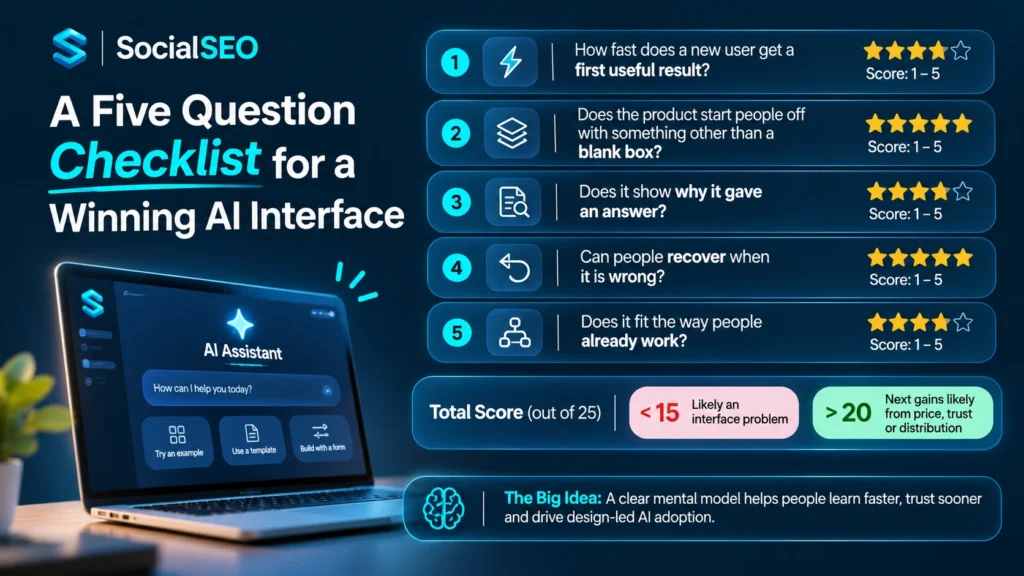
This is our own working framework, not an industry standard. It comes from the patterns above, and you can use it to score any AI product, including your own.
- How fast does a new user get a first useful result? If it takes more than a few minutes, many people will leave. Measure the time, do not guess it.
- Does the product start people off with something other than a blank box? Starter examples, templates and short forms all help.
- Does it show why it gave an answer? Sources, steps and short explanations build trust and help people check the work. This is where a human in the loop earns its keep.
- Can people recover when it is wrong? Undo buttons, edit options and clear ways to correct the tool matter more than a perfect first answer.
- Does it fit the way people already work? The best onboarding feels like part of a person’s normal day, with clear discoverability so people can find features without a manual.
Give each question a score from 1 to 5 and add them up. A total under 15 suggests the product has an interface problem, not a model problem. A total above 20 suggests the next gains probably come from somewhere else, such as price, trust or distribution.
Behind all five questions sits one idea: the mental model. People adopt a tool when they can guess how it works. If the interface matches how people already think, they learn faster and trust it sooner. This is the core of design led AI adoption, and it is why product design and AI adoption belong in the same sentence.
India: voice, Hinglish and the next wave
If the interface really decides adoption, India is where the test gets interesting. Many Indian users move between Hindi and English in a single sentence, often on a mid range Android phone with a patchy connection. Typing a careful English prompt is a real barrier for many of them.
OpenAI seems to see this too. In mid October 2026, it began rolling out an update to ChatGPT voice that added two native Hindi voices. The company’s applications chief, Vijaye Raji, said in coverage by Career India that to be accessible and used in India, OpenAI needs to focus on voice. The same report says OpenAI is training its models to handle switching between English and Hindi inside one conversation. OpenAI executives also say ChatGPT usage in India has roughly doubled over the past year.
Two things are worth taking from this.
First, voice is an interface choice, not just a feature. Speaking removes the typing barrier. It also helps people who think out loud better than they write, which connects straight back to the articulation barrier.
Second, a Hinglish AI assistant is a design problem as well as a model problem. The model has to understand mixed speech, and the product has to handle it gracefully: showing text in the right script, handling background noise, and working on a slow connection. Teams that treat this as only a model upgrade will miss half the work.
For founders and marketers, this has a direct content angle. Bilingual content that sounds like real speech already performs well in Indian cities, and we explain how founders use voice and likeness responsibly in our guide to AI clones for founders in India. The same logic applies to products: build for how people actually talk.
If you are building or marketing an AI voice interface for India, test it with real users in real conditions. A demo in a quiet office tells you very little.
Usage is not value: what McKinsey’s 2026 numbers suggest
Here is a reality check on adoption itself. McKinsey’s State of AI in 2026 found that nearly nine in ten respondents say their organizations use AI regularly in at least one business function. Eight in ten say AI has improved their own productivity. But only 37 percent say AI contributes at least some earnings impact, and that share is essentially unchanged from last year. Only about 6 percent qualify as AI high performers, meaning they attribute at least 5 percent of earnings to AI and call its impact significant.
Read that carefully. Lots of people use AI, and many feel more productive, but most organizations have not turned that into financial results. We do not claim McKinsey blames interfaces. The report does not say that.
We do think the gap raises a fair question for anyone working on AI adoption strategy. If a tool is easy to try but hard to use well, you get exactly this pattern: wide use, thin results. Some of the answer is change management, training and workflow design. Some of it may be product design, such as clearer onboarding, better defaults and fewer places to get stuck. Teams moving from a pilot to scaling should check both.
My own product design rabbit hole
In the reel behind this post, I said that if I had the option, I would spend my day time working on product design, because whoever figures out the AI user interface is going to go crazy with growth. I also said I went down that rabbit hole for some of my own apps.
I want to be careful here. I am not claiming a case study with numbers. What I can say honestly is that the habit changed how I judge AI tools. I now ask the five questions above before I ask which model a tool uses.
Priyansh: add one real example here before you publish. Name the app, say what you changed first, and describe what happened. A before and after screenshot would make this section much stronger. Delete this line when you are done.
Numbers and claims to stop repeating
Many pages on this topic copy the same weak claims. Here is what we would drop.
- “Half the population cannot write prompts” as a fact. It is Nielsen’s estimate. Present it that way.
- “Microsoft invented the graphical interface.” It did not. Xerox and Apple came first. Windows made it mainstream.
- “ChatGPT worked because of the interface alone.” The interface mattered most for adoption, but OpenAI also tuned the model for dialogue and made it free.
- Large numbers with no source. Several pages we reviewed repeat a flat 90 percent AI startup failure rate, a hallucination range as wide as 22 to 94 percent, or a multi trillion dollar impact figure without naming a study, a year or a method. If a page cannot tell you where a number comes from, do not repeat it.
Dropping these claims makes your own writing easier to trust, and trust is what helps a page earn links over time.
Frequently asked questions
Why did ChatGPT go viral if earlier GPT models already existed?
Earlier models sat behind an API and a test page, so mostly developers used them. ChatGPT put a model in a simple chat box, tuned it for dialogue, and made it free to try. That combination let anyone start in seconds.
Is the interface more important than the AI model?
For adoption, often yes, because people cannot use what they cannot figure out. For quality, no. A weak model behind a great interface still disappoints. The strongest products get both right, plus price and trust.
Why do people struggle to use AI tools?
Common reasons include the blank page problem, unclear features, and not knowing how to describe the task. Many people also do not trust answers they cannot check. Good onboarding, examples and visible sources fix most of these.
Is chat the best interface for AI?
Chat suits open ended requests, and it is flexible and familiar. Structured screens, buttons and previews often work better for repeat tasks. Most experts expect a mix of both, not one winner.
What is the articulation barrier in AI?
It is the gap between what a person needs and how clearly they can put it into words. Jakob Nielsen coined the term for prompt based AI tools. Templates, examples and voice input can all reduce it.
What is the difference between Claude Code and Cowork?
Both are built on the same foundations. Claude Code runs in a terminal and suits developers. Cowork lives in the Claude desktop app, works with a folder you choose, and targets people who do not code.
Why do AI products fail even when the model is good?
Usually because of the product around the model. Slow first results, unclear features, no way to recover from mistakes, low trust, high price or poor distribution can each sink a strong model.
Will AI move beyond the chat box?
Probably yes, in part. Expect chat plus buttons, panels and screens generated on demand. Chat will likely stay as one layer, especially for open questions.
How does voice change AI adoption in India?
Voice removes the typing barrier and suits people who mix Hindi and English. OpenAI added Hindi voices to ChatGPT in October 2026 and says it is working on code switching. Good design for slow connections and mixed speech matters just as much.
How can a product team test whether its AI has an interface problem?
Score it on the five question checklist above, and watch five new users try it without help. If they stall in the first few minutes or ask what to type, you have an interface problem, not a model problem.
Final thoughts
The model is the engine, and the interface is the door. Every big wave of adoption we looked at followed the same pattern: a capable engine existed, a small group loved it, and then someone built a door that fit ordinary people. Command lines gave way to windows, text pages gave way to browsers, and APIs gave way to a chat box. Cowork is the same move again, one step further along.
The next wave will go to teams that build the door well and then back it with fair pricing, honest answers and good distribution. Score your own product on the five questions this week. The weak spots will tell you where to start.
If you want content that explains your AI product in plain language, talk to our team.
About the author
This article comes from the SocialSEO team in Noida, India. We are a social media and personal branding agency that helps founders and brands turn attention into real business, from founder led content and fan page marketing to AI powered Instagram DM automation. We use AI tools in our own work every week, so we have felt the blank prompt box, the clumsy first try and the moment a good interface finally makes a tool click.
We write about UX for AI products and AI adoption in plain language, with sources you can check. We name our sources, mark our own opinions as opinions, and correct popular claims that do not hold up. If you want content that explains your product clearly, or help building a founder brand around it, talk to our team.
Please note that SocialSEO at socialseo.in is an independent Indian agency and is not connected to the US company at socialseo.com.
